
Aximote: Car Data
AximoteAuto & Vehicles
4.812.00 Reviews
- Version
- Varies With Device
- Installs
- 10.00K
- Age Rating
- Everyone
Screenshots
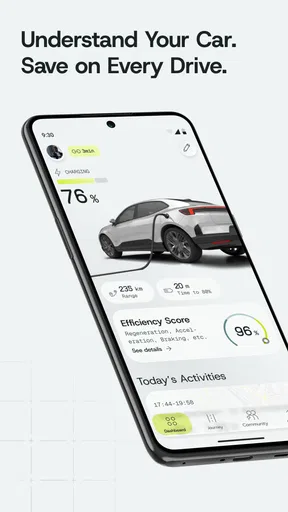
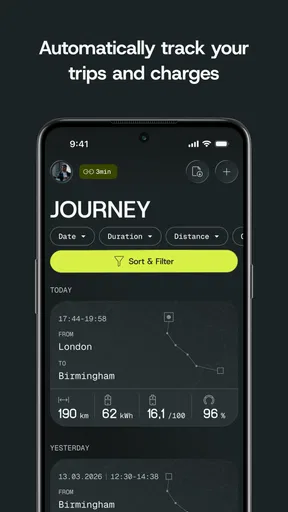
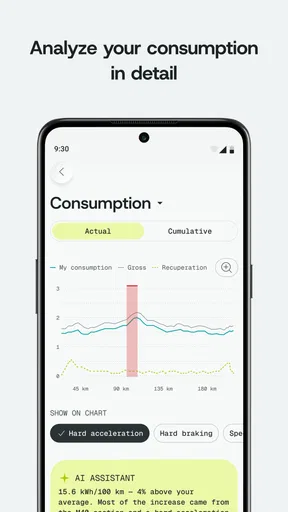
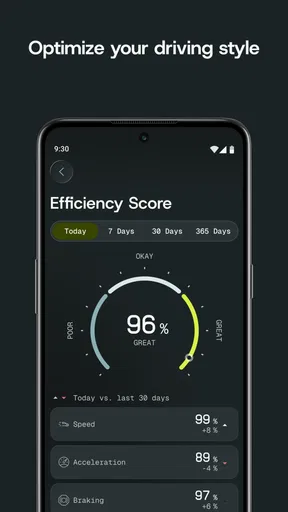
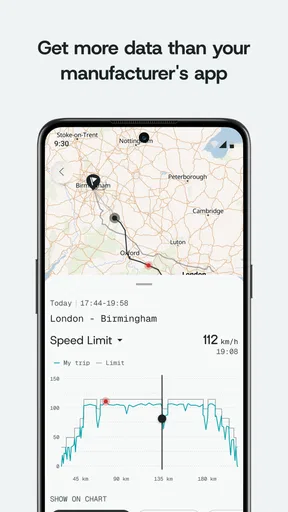
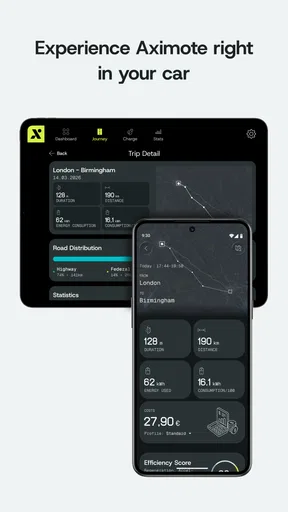
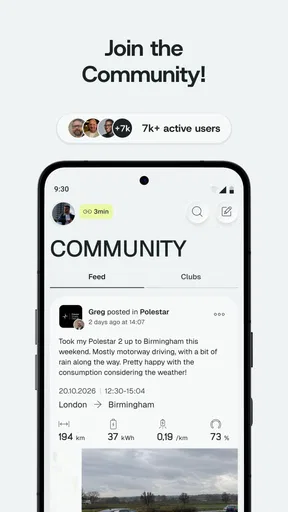
Our Review of Aximote: Car Data
 Analysis by Appyee
I usually decide whether a car app deserves a permanent place on my phone by asking a simple question: will it help me make better decisions after a few weeks of ordinary driving, or will I stop opening it once the novelty fades? Aximote: Car Data takes the more practical route. It is designed for keeping an eye on car costs, fuel or charging, trips, and driving insights, so its value depends less on flashy presentation and more on whether you are willing to record information consistently.
That makes it an interesting choice in the Auto & Vehicles category. I see it as a personal record book for car ownership, with enough room for people who want to understand where their money and mileage are going. It is free to install, rated for Everyone, and comes from Aximote. The app has reached over ten thousand installs and holds a 4.8 average from roughly three hundred ratings, which suggests that its focused approach is connecting with the people who want this kind of tracking.
How I Would Decide If Aximote Fits My Driving Habits
The first decision is not about the interface; it is about the information you actually want to manage. If your main concern is fuel spending, the useful question is whether you want a running history rather than a single receipt or a rough memory. If you drive an electric vehicle, charging records can give you a similar view of energy-related costs. If you regularly make longer journeys, trip history and driving insights may be more useful than a simple expense note.
I would also consider how often I am prepared to enter details. A car-cost tracker only becomes meaningful when entries are made at the right moment. Waiting several weeks and trying to reconstruct every fill-up or charging session creates gaps, and those gaps can make any conclusions misleading. My practical advice is to use it immediately after refuelling, charging, or completing a trip, while the details are still fresh.
The app is most appealing if you have one or more vehicles and want a clearer picture of ownership over time. It can help turn scattered information into a routine: record the event, review the pattern, and use that pattern when planning the next journey or checking whether a change in driving habits is actually helping. I would not choose it merely because I want a navigation tool, roadside assistance, or a replacement for a vehicle dashboard. Its purpose is narrower and more useful when treated as a tracking companion.
Another decision criterion is the kind of insight you expect. Some drivers only need a reminder of when they last bought fuel. Others want to compare ordinary commuting with weekend travel, notice unusually expensive journeys, or understand how charging fits into the household budget. Aximote makes more sense for the second group, provided they are comfortable maintaining their own records instead of expecting the app to do all the work automatically.
A useful setup for the first week
I would begin with a normal week rather than trying to create a perfect historical archive. Record each fuel stop or charging session, add the trips that matter, and keep the notes consistent. For example, use the same approach to distinguish a daily commute from a long-distance journey. This creates a clean starting point and makes the first review more trustworthy than a rushed batch of estimates.
One non-obvious benefit of that approach is that it reveals which records are genuinely worth keeping. You may discover that charging costs are the main concern, while detailed trip entries are only useful for business travel. Or you may find the opposite: fuel spending is stable, but repeated short journeys are where your driving pattern becomes expensive. The app is more valuable when you let your own routine decide what deserves attention.
Where the focused approach works best
In my experience, the strongest part of this kind of app is the connection between separate car activities. Fuel, charging, trips, and driving behaviour are often stored in different places: a bank statement, a dashboard reading, a calendar, or memory. Bringing them into one personal record can make ordinary decisions less vague. I can look at a journey as more than distance alone and ask what it cost, how often I repeat it, and whether it is worth changing.
This is particularly useful for people who alternate between different types of driving. A driver might use a car for short urban errands during the week and longer family trips at the weekend. Looking only at the monthly fuel bill would hide the difference between those uses. Separating trips in a consistent way can show which journeys are driving the total upward and which are relatively efficient.
It can also help when a vehicle is shared. Even without turning the app into a formal household accounting system, a shared routine for recording trips and energy purchases can reduce the usual uncertainty around who used the car and why costs changed. The important point is consistency: if one person records every event and another records only occasional ones, the resulting picture will be incomplete.
The real strength is not the act of entering a number; it is the habit of turning that entry into a decision. After several weeks, I would use the history to choose a better time for errands, question unnecessary repeated journeys, or prepare a more realistic travel budget. That is more practical than checking an attractive dashboard once and never acting on it.
Fuel and charging need different expectations
Fuel tracking and charging tracking may look similar from a distance, but they answer slightly different questions. Fuel stops are often easy to associate with a full tank and a clear journey interval. Charging can be more varied, especially when a driver uses different locations or charges at different times. I would therefore avoid comparing the two casually unless the records are entered in a consistent way.
For an electric-car owner, the app may be most useful as a personal charging diary rather than a complete energy-management system. I would use it to notice broad spending patterns and connect charging with trips, not to treat every apparent difference as a precise technical measurement. Home charging, public charging, and occasional free sessions can make a simple average difficult to interpret if they are not recorded in the same manner.
For a petrol or diesel driver, the more useful workflow is to pair each fuel entry with the mileage or trip context that matters to you. That can expose a gradual change that is easy to miss from one receipt, such as a vehicle becoming less economical during a period of heavy short-distance driving. It will not replace a mechanic’s inspection, but it can tell you when a pattern deserves attention.
Trips become more useful when they answer a question
I would not log every journey simply because the option exists. That can turn the app into a chore. Instead, I would choose a purpose: comparing two commuting routes, tracking business mileage, understanding weekend travel, or checking how often I make short trips that could be combined. A clear purpose makes the record easier to maintain and the later review much more meaningful.
A realistic example would be a driver who notices that the monthly car bill feels higher even though the usual commute has not changed. For a week, they record fuel or charging events and separate work travel from errands. The review may show that several small shopping trips are adding more distance than expected. The useful outcome is not a dramatic claim about savings; it is a concrete choice to combine those errands and then observe whether the next period looks different.
That workflow also prevents a common mistake: blaming the car for every increase in cost. Trip context can show whether the change came from more driving, different journeys, or the energy purchase itself. Aximote is well suited to that kind of personal investigation because it brings the records together instead of leaving the explanation scattered across unrelated apps.
How It Compares With the Usual Alternatives
The closest alternative is often a spreadsheet. A spreadsheet offers complete control over columns, formulas, labels, and historical imports. If you enjoy building your own system and want highly customised calculations, it may remain the better choice. Aximote is more attractive when you want a purpose-built place for car information without designing the structure yourself.
A notes app is quicker for a single reminder, such as writing down a fuel amount or a service thought. Its weakness is that notes become difficult to compare. Aximote’s value is the attempt to organise car-related records around costs, charging, trips, and driving insights rather than leaving each entry as isolated text. I would choose notes for occasional capture and this app for a habit I intend to review.
Banking apps can show how much was spent at a fuel station or charging provider, but they usually lack the driving context needed to explain that spending. They may not tell me which journey caused the expense, how the vehicle was being used, or whether the same pattern is repeating. Aximote is a better fit when the question is about the relationship between driving and cost, not merely the transaction.
Vehicle dashboards and manufacturer apps can be preferable when the priority is live vehicle information, remote controls, technical alerts, or data collected directly from the car. I would not expect a personal tracker to replace those functions. Its advantage is a more human view of ownership: the expenses and trips I choose to record, across the situations that matter to me.
There is also a difference between a tracker and an automatic mileage service. Automatic tools can reduce manual work, which is valuable for people who drive constantly or need formal records. The trade-off is that they may be more complicated to configure or less flexible about what counts as a useful entry. Aximote suits someone who prefers deliberate logging and wants to decide which details deserve a place in the record.
Where another option may be the smarter choice
I would skip this app if I know I will not maintain it. No car tracker can create a reliable picture from occasional guesses. Someone who only wants an annual reminder for maintenance may be happier with a calendar. Someone who needs live traffic, route planning, or roadside support should look elsewhere. Those are not weaknesses in the narrow sense; they are signs that the app is designed for a different job.
I would also be cautious if my main requirement is detailed fleet administration. A small business with many vehicles may need permissions, driver management, formal reports, and automated mileage capture. A personal car-data app can still help an individual understand their own driving, but it should not be treated as a full fleet platform without evidence that it supports those operational needs.
People who demand completely automatic data collection may find manual entry frustrating. The app’s usefulness depends on the quality of the information I put into it. That gives me control, but it also creates responsibility. If I want a passive record that works in the background, an integrated vehicle or mileage solution may be a better category of product.
The practical cost of changing from another system
Moving from notes or a spreadsheet is not technically difficult, but the real cost is rebuilding the habit. I would not spend an evening trying to recreate every past journey unless that history is genuinely needed. Start from a clear date, enter new records consistently, and keep older information in its original place for reference. This avoids turning the switch into a project that discourages regular use.
If you already use a spreadsheet, compare the two systems for a short period before abandoning the old one. The question is not which looks more complete; it is which one you will actually open after a fuel stop or charging session. A simpler workflow that survives busy weeks is more valuable than a detailed system that becomes outdated.
There may also be a learning cost in deciding how to classify trips and expenses. I recommend choosing a small number of categories at first. Too many labels create hesitation at the moment of entry and make later comparisons harder. Once the routine feels natural, add detail only when it answers a real question about your car.
The app is free to install, but optional in-app purchases range from around five dollars to over two hundred dollars per item. I would review the purchase screen carefully and decide whether the free experience already covers my intended routine before paying for anything. The wide range means the financial commitment can vary considerably, so I would not assume that installing the app and fully using every capability are the same decision.
That is especially important for a casual driver. If I only want to record occasional fuel costs, a paid upgrade may not make sense. If the app becomes part of a serious long-term tracking habit, I can judge any purchase by the specific time or organisation it saves me, rather than buying simply because more options are available.
Privacy and reliability in everyday use
For a car-cost diary, I would be careful about entering information that I do not need. A useful record does not require me to turn every trip into a detailed personal profile. I would keep entries focused on the car, cost, energy, and purpose of the journey, and I would review the app’s current permission and privacy screens before making it a long-term archive.
Reliability also depends on a backup mindset. Any manually maintained record can suffer if a phone is replaced, an entry is forgotten, or a habit breaks during travel. I would treat the app as a convenient working record and keep important business-mileage or reimbursement information in whatever official system is required. That is a sensible distinction between personal insight and formal documentation.
The Everyone age rating makes the app approachable for a broad audience, but the usefulness still depends on the driver’s situation. A teenager learning the cost of different journeys may gain a better understanding of car expenses, while a professional driver may need more structured reporting than a personal tracker provides. The same simple interface can therefore be a strength for one person and a limitation for another.
My recommendation after weighing the trade-offs
I recommend Aximote: Car Data to drivers who want one focused place to understand fuel or charging, trips, and the everyday cost of using a car. I especially like it for people who are prepared to build a small recording habit and then use the results to change something practical. It is a sensible first step for someone moving beyond vague estimates without wanting to construct a spreadsheet from scratch.
I would recommend starting modestly: track the events that affect your decision most, review the pattern after a normal period of driving, and only then decide whether more detailed logging is worthwhile. That approach keeps the app from becoming a burden and gives its insights a fair chance to prove useful.
I would not recommend it as a universal replacement for navigation, vehicle diagnostics, automatic mileage tools, or fleet software. Drivers who need those functions should choose a product built around them, even if they keep Aximote alongside it for personal cost tracking. The best comparison is not about finding one app that does everything; it is about choosing the tool that matches the decision you are trying to make.
Released on April 25, 2025, and available for Android devices running version ten or later, it is a relatively focused option for current users who want to start recording without an upfront purchase. Its strong average rating and growing install base make it worth considering, but my final judgement rests on the workflow rather than the numbers: if you will log consistently, the app can turn ordinary driving data into useful personal insight. If you will not, a simpler reminder or occasional note will probably serve you better.
Verdict
Strengths of Aximote: Car Data
- Tracks key vehicle data in one convenient mobile dashboard.
- Can help identify unusual readings before they become costly problems.
- Useful for monitoring driving habits and vehicle performance over time.
- Simple access to car information without needing a dedicated display.
- May support more informed maintenance and fuel-efficiency decisions.
Limitations of Aximote: Car Data
- Requires compatible vehicle hardware or connection for full functionality.
- Accuracy depends on the car’s sensors and supported data parameters.
- Some features may vary by vehicle model, adapter, or operating system.
- Continuous connection can increase battery usage during longer drives.
- Not a replacement for professional diagnostics or scheduled servicing.
Similar Picks in This Category
View All
Android Auto
Google LLC4.1

maxim — order a taxi & food
PT. SITO4.7

Штрафы ГИБДД: проверка с фото
Pays LLC – Штрафы ГИБДД4.7

Номерограм – проверка авто
Авто Ассист4.8

Дром Авто
Дром4.9

Frequently Asked Questions
What is Aximote: Car Data used for?
Aximote: Car Data is designed to help drivers view and manage vehicle-related information from a mobile device. Depending on the supported car and connected hardware or service, it may provide access to details such as driving data, vehicle status, trip information, or diagnostic readings. Before downloading, check whether your vehicle, region, and required connection method are compatible with the app.
Is Aximote: Car Data compatible with every car?
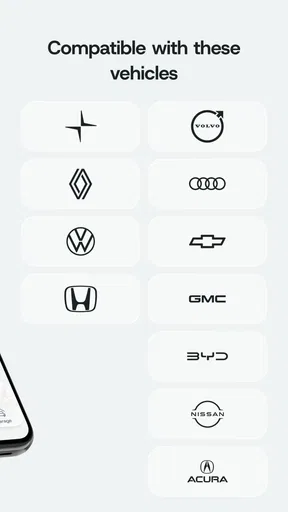
No. Compatibility can depend on the vehicle manufacturer, model year, onboard systems, and any adapter or connected service required by the application. Some features may work only with specific vehicles or Aximote-supported devices. We recommend reviewing the app listing and compatibility information before installation, because downloading the app alone may not be enough to access all car-data functions.
Does Aximote: Car Data require additional hardware or accessories?
The app may require a compatible vehicle connection, adapter, account, or other supported equipment to retrieve car information. Availability can vary according to the vehicle and the features you want to use. If you install the app without the necessary hardware or service, you may be able to open it but have limited functionality. Confirm the connection requirements before purchasing any accessory.
Is Aximote: Car Data free to download and use?
The application may be available to download without an upfront charge, but that does not necessarily mean every feature is free. Certain functions could depend on a subscription, connected service, compatible hardware, or fees associated with your vehicle-data provider. Check the current Google Play or App Store listing for pricing, in-app purchases, and subscription conditions before relying on the app.
What privacy information should I consider before using the app?
Because Aximote: Car Data is intended to work with vehicle-related information, it may process data such as trips, location, driving behavior, vehicle identifiers, or diagnostic details, depending on the features enabled. Review the app’s privacy policy and requested permissions carefully. Only grant access that is necessary, and avoid sharing account credentials or sensitive vehicle information with other people.
